Home / Best Football Telestrator

Best Football Telestrator

An honest guide — including where the others win

There's no single best telestrator. There's the best one for a network truck, the best one for a high school film room and the best one for a YouTube channel. This guide sorts the main options by who they're actually built for, so you can skip the ones that don't fit.

We Make One Of These. Here's How We Wrote This.

ProPlayVision is our product, so we're not neutral. What we've tried to do is describe every tool by what it's genuinely good at, using each company's own published information, and say plainly when another product is the better choice.

We looked at five things: who it's built for, price transparency, what you need to install or buy, football-specific tools, and how finished work gets out — to a live broadcast, a film room or social media.

Written by Paul "Kobra" Gleason

Credited author of the EA Sports Official Madden NFL 09 and Madden NFL 10 Strategy Guides, former youth football coach, running MaddenGuides.com since 2001 and now building X's O's Chalkboard at ProPlayVision. I've spent more than two decades drawing football on film, by hand and with software.

Updated October 11, 2026

The Best Football Telestrators By Use Case

01

Chyron PAINT

Best for network & pro broadcast

PAINT is a broadcast replay and telestration system with 3D effects, AI-driven player tracking, multi-angle analysis and integration with sports data providers. Chyron describes it as the world's leading telestrator, and if you're producing live network or pro-league coverage, this class of system is the standard.

Choose it if: you're a network, a pro team's production crew or a broadcast truck that needs replay and telestration in the same live workflow.

Skip it if: you're one coach or creator. It's built and priced for a production environment.

Trade-offs: pricing is by quote, and it's built for broadcast production rather than individual coaches or creators. Chyron PAINT alternative →

02

FingerWorks

Best for broadcast studios & iPad telestration

FingerWorks has built software telestrators for broadcasters since 1998, with desktop and server products for production and an iPad app for mobile telestration. That long track record across broadcast is its biggest strength.

Choose it if: you run a studio or broadcast operation, or you want to telestrate by hand on an iPad.

Skip it if: you want tools built around football specifically. The lineup serves many industries.

Trade-offs: broadcast products are quote-based, and the lineup serves many industries rather than football alone. FingerWorks alternative →

03

Hudl (with Hudl Studio)

Best for programs already on Hudl

Hudl's strength is the whole team film workflow: exchange, storage, sharing and stats. Hudl Studio adds advanced telestration with automatic tracking for Hudl Sportscode users. If your league already exchanges film on Hudl, that platform is part of your week no matter which telestrator you use.

Choose it if: your program needs film exchange, team storage and stats in one place, and you already work in Sportscode.

Skip it if: you already have your film and just need to draw on it and get it out fast.

Trade-offs: team package pricing, and the advanced telestration lives inside the Sportscode ecosystem. Hudl alternative →

04

KlipDraw

Best for multi-sport analysts on desktop

KlipDraw is desktop telestration software for Windows and Mac used across many sports. Tiers run from static illustrations up to full motion with player tracking, sold as 6- or 12-month subscriptions with published prices.

Choose it if: you analyze several sports and want installed desktop software with published pricing.

Skip it if: you want football-specific tools out of the box, or monthly billing.

Trade-offs: it's a download, it's multi-sport rather than football-specific, and tracking is reserved for the top tier. KlipDraw alternative →

05

ProPlayVision Our product

Best for football coaches, creators & indie streams

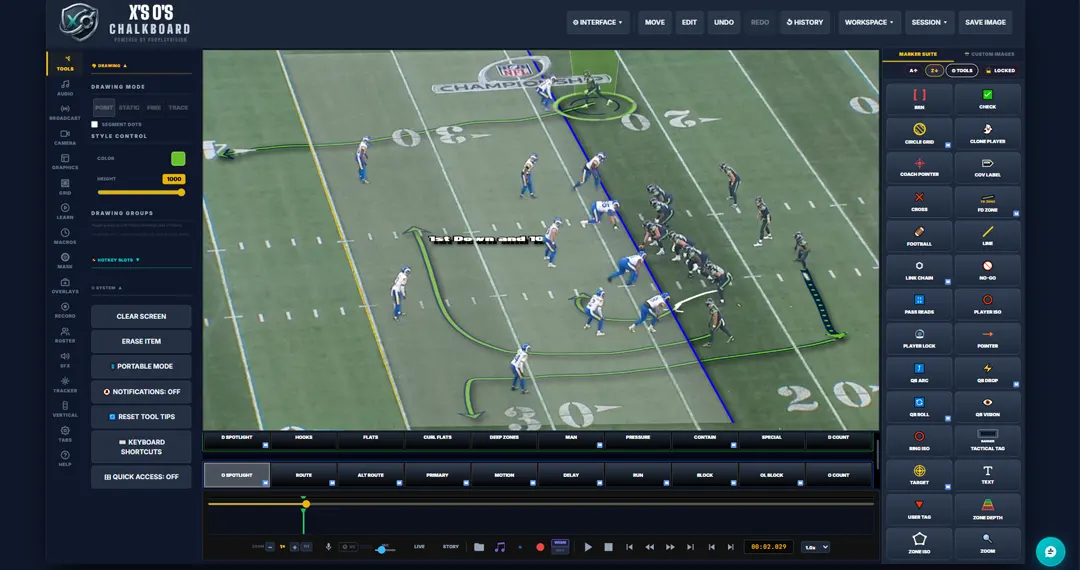
X's O's Chalkboard is a browser-based telestrator built football-first: 84 football tools, a 3D perspective engine, assisted player tracking, one-click OBS output, 9:16 vertical clips, voice commands and a built-in editor. Published plans from $19.99/month, month to month.

Choose it if: you coach, make YouTube breakdowns or stream games and want football tools without installing anything.

Skip it if: you need team film exchange, a sport other than football, or a system for a network truck.

Trade-offs: it isn't a team film-exchange platform, its sport-specific tools are for football only so far, and it isn't built to drop into a network broadcast truck. A closer look below →

Competitor details are based on each company's public product pages as of September 2026 and may change. Check with each vendor for current features and pricing. All trademarks belong to their owners.

Side By Side At A Glance

Built forFootball-specificPlayer trackingPlatformPricing
Chyron PAINTNetwork & pro broadcastMulti-sportAI-drivenBroadcast systemQuote
FingerWorksBroadcast, education, iPadMulti-industrySee vendorDesktop / server / iPadQuote (broadcast)
Hudl + StudioTeam film workflowMulti-sportAutomatic, in Hudl StudioWeb + apps; Studio via SportscodeTeam packages
KlipDrawMulti-sport analystsMulti-sportTop tierWindows / Mac downloadPublished (6/12-month)
ProPlayVisionFootball coaches & creatorsYes, 84 football toolsAssisted, all plansWeb browser, nothing to installPublished, monthly, free Film Room

"See vendor" means we couldn't confirm it from the company's public pages. Check with each vendor before you buy.

What X's O's Chalkboard Does Differently

Most telestrators give you a pen and some shapes, and you build the football yourself. X's O's Chalkboard starts from the football: the tools already know what a gap, a route or a coverage shell is, and the drawings sit on the field at the camera's angle instead of floating on top of the video.
X's O's Chalkboard telestrator drawing a first down marker on football film
X's O's Chalkboard drawing on game film in the browser.

Football tools, not just shapes

Routes, gap stamps, run fits, coverage zones, QB vision cones and read progressions, ready to place. See them on our coverage diagrams and route tree pages.

Drawings that sit on the field

A 3D perspective engine lays routes and zones on the turf at the camera's angle, so they look like a broadcast, not a whiteboard.

Live to OBS in one click

A clean output window with only your video and drawings, ready for OBS Window Capture. No plugin needed. See telestrator for OBS.

Made for creators

9:16 vertical clips for Shorts and Reels, voiceover recording and a built-in editor, so a breakdown goes from film to upload in one place. See telestrator for YouTube.

Nothing to install

It runs in a desktop browser on Windows or Mac, including locked-down school computers. See telestrator for Mac and high school football.

Try it before you pay

The free Film Room lets you draw on your own clip in the browser. Full plans start at $19.99/month, month to month.

Three Questions That Decide It

1. Where does the finished work go?

A network broadcast points you to Chyron PAINT or FingerWorks. A film room, a YouTube channel or a Twitch stream opens up browser tools like ProPlayVision.

2. Do you need a team platform or a telestrator?

If you need film exchange and team storage, that's a platform decision first. If you already have film and need to show it better, you need a telestrator.

3. Does it need to know football?

Multi-sport tools give you shapes you adapt. A football-specific tool gives you gap stamps, run fits, coverage zones and read progressions out of the box. See how that works in our guide to telestrating football film.

4. What's your budget, really?

Broadcast systems and team platforms are priced by quote or by package. If you're one coach or one creator, look for published monthly pricing and a free way to try it first, so you're not committing before you've drawn a single route. New to all this? Start with what a telestrator is, or see how analysts use one for NFL film breakdown.

Telestrator Questions

What is the best telestrator for high school football?

For most high school staffs the deciding factors are price, easy access on school computers and football-specific tools. A browser-based tool with published pricing, like ProPlayVision, fits that well; pair it with a team platform if your league requires film exchange.

What is the best telestrator for YouTube?

Look for vertical 9:16 export, voiceover recording and a built-in editor so you're not bouncing between apps. See telestrator for YouTube.

What telestrator do NFL broadcasts use?

Network broadcasts use professional broadcast systems. Chyron PAINT describes itself as the world's leading telestrator, and FingerWorks has served broadcasters for over 25 years.

What happened to Coach's Eye?

TechSmith retired Coach's Eye, a popular mobile app for drawing on sports video. See our Coach's Eye alternative for football coaches.

Is there a free football telestrator?

There are free general-purpose telestrators with basic pens and shapes. ProPlayVision has a free Film Room you can use right in your browser to draw routes, circles, pointers and notes on your own football film. The full X's O's Chalkboard, with football-specific tools, starts at $19.99/month.

Can I use a telestrator with OBS?

Yes. X's O's Chalkboard opens a clean output window with just your video and drawings, and OBS picks it up with a normal Window Capture. No plugin is needed. See telestrator for OBS.

Is there a football telestrator for Mac?

KlipDraw offers a Mac download, and browser-based tools such as ProPlayVision run on a Mac without installing anything. See telestrator for Mac.

Find The Right Tool. Then Start Drawing.

Try the free Film Room on your own clip. When you want the full football toolkit, X's O's Chalkboard plans start at $19.99/month, month to month, cancel anytime.

Try It Free