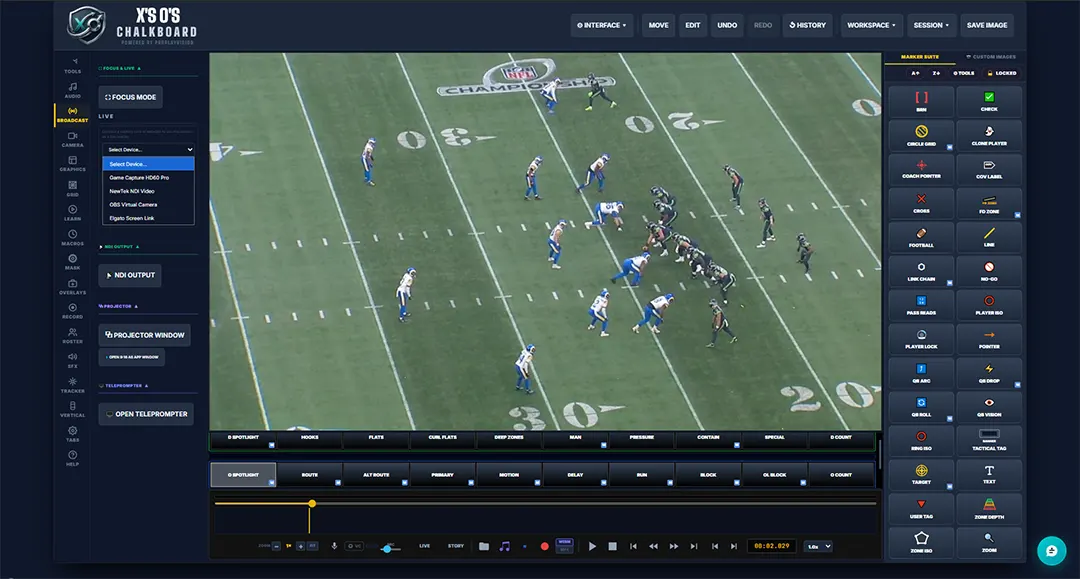
Broadcast & Output
OBS output, device capture, projector window, and teleprompter — all in one tab
Offense — Routes & Paths
15 ToolsBlock
White blocker path showing blocking assignments and lead block lanes.
Delay
Purple delayed route path — perfect for illustrating RB check-releases and late stems.
FD Zone — LOS & 1st Down
The blue line of scrimmage and the yellow first-down line in one tool, laid on the turf in perspective and drawn under the players. Six-point drawing fits the field in one pass, and the optional painted banner puts “1ST & 10” on the grass in team colors.
Line
Simple straight line for clean annotations, dividers, and custom diagram elements.
Link Chain
Chained connection graphic linking two points — great for showing read progressions in order.
March Arrow
Flowing chevrons that show direction of movement. Draw it through the hole to show the back's path behind the run blocking. Adjustable size, speed and color, or swap the chevrons for scrolling text.
Motion
Blue pre-snap motion path to diagram receiver shifts and jet motion assignments.
OL Block
Offensive line protection path using a specialized cone to chart gap assignments.
QB Arc
3D-aware pass trajectory with a visual landing cone placed at the receiver's catch point. Accounts for field perspective.
QB Drop
Diagrams the quarterback's exact dropback depth and footwork on any given play.
QB Roll
Maps a quarterback rollout — direction, depth, and launch point on designed bootlegs.
QB Vision
Drag-to-place vision cone showing exactly where the quarterback is focused in the progression.
Routes — Standard, Alt & Primary
Three route styles in one toolset: the standard yellow route arrow for any breakdown, an alternate yellow path for option routes and secondary reads, and a red-glow primary route that instantly marks the quarterback's #1 target.
Run
Brown run path arrow used to diagram handoffs, carries, and designed runs.
Trace
Follow a receiver click by click — click him, step the video, click again — and his real route becomes a clean line that draws on right behind him as the play runs.
Defense — Coverage & Pressure
9 ToolsContain
Brown perimeter contain path used to diagram edge containment on scrambles and designed rollouts.
D Count
Red defensive personnel counter to identify box count, even fronts, and coverage rotations pre-snap.
D Vision
Vision cone for a defender, showing what he's keying on before the snap. Put it on a linebacker eyeing the running back: if the back releases on a route, he carries him; if the back stays in, he's free to drop into his zone or come on the blitz. Shows the read behind the reaction.
Man
Gray man coverage path to show individual assignment tracking and trail technique.
Player Mask
Click a player and he lights up in solid color, cut cleanly off the field with his shadow left out — mark the defender to watch so nobody misses him. Handles two players touching, too.
Pressure
Blitz and pressure path variants — visualize aggressive pass-rush tracks and stunt paths.
QB Spy
Mark the spy — a circle on the defender with a line back to the quarterback he’s shadowing. Turn the line off to drop spy circles one after another.
Stunts
Twist and stunt paths for the defensive front — show the tackle crashing and the end looping behind him, so the viewer sees how the rush trades gaps.
Zones — Hooks, Flats, Curl Flats & Deep
Every zone drop in one set: hook, flat, curl-flat and deep-third / quarter / half shells, color-coded the way broadcasts show coverage so viewers read the shell at a glance.
Stamps & Icons
21 StampsA / B / C / D Gaps
Mark the interior run lanes from A gap through D gap — as indicator triangles or as plain letter stamps — to call out where the ball is going or where the blitz is coming from.
BRN Bracket
Four corner brackets snap in around a player and pulse to lock the viewer's eye on him, with a label tag on top — BRN by default, or type your own like PRESS or KEY.
Callout
Draw the pointer, type right on the bubble — a label for a player, a read, or a coaching point. Multi-line with Shift+Enter, sized in real numbers, and it stays the same size anywhere on the field.
Check / Cross
Green checkmark and red X stamps for quick good/bad call analysis and read confirmation.
Coverage Label
Coverage text label stamps — Cover 0 through Cover 4, Tampa 2, Quarters, and more.
Down & Distance
Down and distance display badge in broadcast format. Set the situation for your audience instantly.
Football
Football icon stamp to mark snap point, catch location, or point of attack.
Ghost
Lifts a player straight off the video frame and drops a soft-edged copy wherever you place it — show where a man should have been, or where he ends up, without redrawing him.
Leverage
Shows which side a defender is shading. A label pill with three animated chevrons pointing inside or outside, set relative to the field so it reads right on either hash. One click flips it.
No-Go
Circle-slash no-go stamp for marking covered receivers, locked-out throwing lanes, or bad reads.
O Count
Yellow offensive player counter to identify personnel groupings and formation structure.
Pass Reads
Numbered pass read stamp to diagram the full progression — 1 through 5 in broadcast style.
Player Nameplate
Broadcast-style name plate under any player, pulled straight from your roster. Several plate styles plus team colors, placed in one click from the roster bar.
Pointer
Orange directional arrow stamp for quickly pointing out alignments, technique, or leverage.
Star Plate
Player name plate with a 1–5 star rating — grade a performance, flag the standout, or rank a matchup right on the field.
Tactical Tag
A label box you type anything into — MESH, FLOOD, INSIDE ZONE, 3RD & LONG. Sizes itself to the words, with your own colors, border and font.
Target
Crosshair target stamp — snap it on any player to draw immediate attention to a key read.
User Tag
Red marker that sits over the player being controlled, so viewers always know which man you are following.
X / Y / A / B / RB / QB
Xbox controller button stamps — X, Y, A, B for the receivers, RB and QB for the backfield — to label who's who in any breakdown, the way Madden players already read them.
✕ / △ / ○ / □ / R1 / QB
The same player labels for PlayStation players — Cross, Triangle, Circle and Square for the receivers, R1 and QB for the backfield. One click switches the whole icon bar between Xbox and PS5.
Coaching Icons
Classic playbook letters — X, Z, Y, R, F and Q — in clean white circles, for breakdowns that talk football instead of controller buttons.
Animated Field Graphics
18 Live OverlaysArea ISO
Dim the whole field except one area you click out yourself — a throwing window, a coverage hole, the space a defender owns. Adjustable dimming and a feathered edge, with the outline optional.
Circle Grid
Gridded circle marker for field zone mapping and area-of-responsibility diagrams.
Clone Player
Click a player and he lifts right off the video in his real colors. Drop the copy anywhere, or draw a route and he runs it — show where he should have been, or where he ends up.
Coach Pointer
Animated pointer finger graphic — just like a real film room, point directly at what matters.
Custom Image
Place any uploaded image, graphic, or animation directly onto the field as a live overlay.
Dual Ring
Two counter-rotating rings for high-energy player highlights and featured matchup callouts.
Ground Ring
Animated spinning ring that sits on the turf in 3D perspective around any player.
Player ISO
Darkens everything outside a circular window — spotlight-effect focus on one player.
Player Lock
Targeting ring with animated spin and player name display. Locks the audience's eye on one player.
Poly Zone
Freehand polygon zone — draw any shape coverage or field area with custom fill and opacity.
Ring ISO
Animated highlight ring that pulses around a player to isolate them in a crowded formation.
Slide Protect
Blocking shield graphic with directional animated chevrons and text mode for protection calls.
Spotlight (D)
Animated defensive spotlight beam — blue-coded, animates down onto a defensive player.
Spotlight (O)
Animated offensive spotlight beam — mint-coded, animates down onto a skill position player.
Zone Depth
Three stacked zones — short, mid and deep — in traffic-light colors so coverage layers read at a glance. Draw it with 4 corners or 6 points to bend the sides along the sideline.
Zone Fill
Click four corners and a see-through box lays flat on the field — label it HOOK, CURL or anything you like. Press Enter to lock it in, then Duplicate to copy it across the field.
Zoom
Field zoom tool to push into a specific area of the frame for detail-level analysis.
Zoom Circle
A magnifying circle you place on the field — it shows a zoomed view of whatever is under it, so the detail is blown up while the rest of the field stays in view.
System & Studio Features
Full Production Suite| Feature | Description | Plan |
|---|---|---|
| OBS Output | The dedicated OBS Live output window — nothing but your canvas. Capture it in OBS with a Window Capture source; no plugin, no setup. (Every plan can also capture the Projector window the same way.) | Coach |
| Full-Screen Projector | Push your finished chalkboard to a second monitor or big screen for a professional film room presentation mode. | All Plans |
| Macro System | Time-coded drawings that auto-play in sync with your video. Set draw-in and draw-out timing for each element. | Coach |
| Script / Loadout System | Save and recall full drawing sets as named loadouts. Switch between entire play diagrams in one click. | Coach |
| Voiceover / Mic | Record live audio with three-band EQ (bass, mid, treble) built directly into the tool. No external software needed. | All Plans |
| Audio Waveform | Visual waveform display for monitoring live mic and backing track levels in real time. | All Plans |
| Backing Audio | Separate backing track volume control for music or ambient audio behind your voiceover. | All Plans |
| Player Tracker | Lock any drawing to automatically follow a player frame-by-frame through the video. Routes and rings move with the player. | All Plans |
| AI Player Tracking | Automated player detection and tracking — the system identifies and locks onto players without manual selection. | Broadcast |
| Clone Player Tool | Click a player and he lifts off in his real colours, shadow and all. Drag the copy anywhere — a dotted trail follows from where he started — or send him along a route. Ghost makes a player vanish the same way. | All Plans |
| Mask Mode | Per-tool layering control — place drawings over players, under players, or field-only for clean depth ordering. | Coach |
| 3D & Perspective | Per-tool perspective factor and tilt so every graphic warps to match the exact camera angle of the Madden turf. | All Plans |
| Transform Controls | Scale, rotate, and flip every individual element independently for precise placement. | All Plans |
| Effects | Drop shadow, fade in/out, and opacity control on a per-item basis for professional polish. | All Plans |
| Dark / Light Theme | UI theme toggle — full dark mode and light mode for working in any environment. | All Plans |
| Grid Snap | Field grid overlay with magnetic snap for perfectly aligned and consistent diagram placement. | All Plans |
| Hotkey Customization | Fully reassignable hotkeys for every tool. Build a keyboard layout that matches your workflow. | All Plans |
| Export / Save / Load | Full session save and load system — export as file, import on any machine, or save portable HTML. | All Plans |
| 9:16 Vertical Mode | Auto-pan and reframe your 16:9 footage into vertical 9:16 format for Instagram Reels, TikTok, and YouTube Shorts — with smooth easing and full telestration support. | All Plans |
| Virtual First Down Line | Broadcast-accurate virtual first down line and line of scrimmage — renders under players with correct field perspective, just like an NFL broadcast. | All Plans |
| Broadcast Graphics Suite | Full broadcast overlay package — lower thirds, score bug, down & distance, top plays countdown and subscribe bug for streaming. | Broadcast |
| Live Video Feed Capture | Capture any live video source — browser tab, window, or connected device — and telestrate directly on the live feed in real time. | All Plans |
| Drawing Groups | Organize drawings into named groups with individual visibility toggles — show or hide entire play concepts in one click. | All Plans |
| Storyboard Mode | Multi-slide presentation system with per-slide transitions — build a complete film session as a sequence of annotated frames. | All Plans |
| Segment Dots | Dots marking each bend in a clicked-out route or line — show break points, spacing and step counts. | All Plans |
| Teleprompter | Built-in scrolling teleprompter with adjustable speed — read your script while recording without a second screen. | Broadcast |
| Face Cam Overlay | Picture-in-picture face cam with rect or circle crop, drag-to-reposition, and device selection — all inside the browser. | Coach |
| Voice Commands | Hands-free tool switching and playback control via voice — call out tools and commands while your hands stay on the mouse. | All Plans |
| Cut Room Editor | A full timeline editor in its own window. Six editing tools (select, blade, ripple, roll, slip, slide), 30 transitions, opacity/scale/volume keyframes, voiceover recording and offline export to MP4 or WebM. Send a take across, trim it, and send the cut straight back to the Chalkboard. | All Plans |
| Thumbnail Creator | Build finished thumbnails from a frame of your footage. Quick presets, 14 display fonts, stroke and glow effects, badges, callouts, the Madden rating card, a logo library and a bottom info bar with social icons. Exports at YouTube, square and vertical sizes. | All Plans |
| Playbook List Graphic | Paste in team names and get a colour-coded card showing which playbooks carry a given play — placed straight onto the field as a broadcast graphic. | All Plans |
| Formation Creator | Build a formation diagram from scratch, position every player, and drop the result onto the field as a graphic. | All Plans |
| Play Tagging | Mark in and out points as you watch, tag the concept, and build a searchable list you can jump between or play end to end. | Coach |
Ready to put these tools to work?
All plans include instant access. Scale up for broadcast-grade output and automation features.