CHOOSE
YOUR PLAN

ProPlayVision Pricing — Plans & Sign Up

ProPlayVision pricing starts at $19.99/month across three plans — Content Creator, Coach, and Broadcast — for the browser-based football telestrator. No hardware, no install, cancel anytime.

Monthly
Annual Save 20%
Billed annually — save 20% compared to monthly

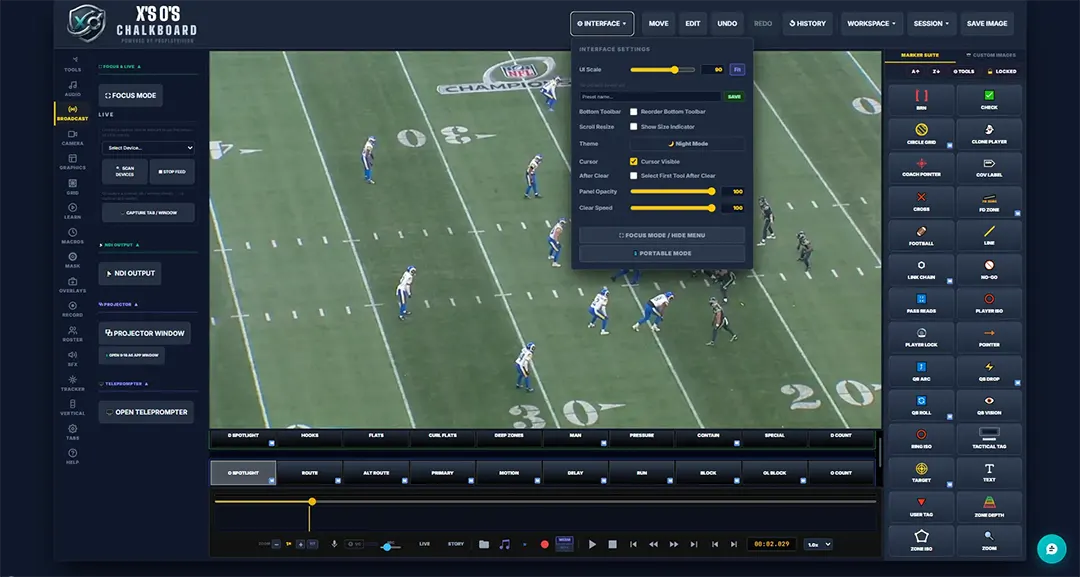
Fully customizable interface — UI Scale, themes, panel opacity, and more

Pro Play Vision telestrator interface settings panel showing UI Scale, theme, panel opacity, and broadcast controls
Tier 01
Content Creator
$ 19 .99  / mo

Draw plays, break down film, and start creating content. Everything you need to get going.

  • ✓84 Drawing Tools — Routes, zones, markers, spotlights & more
  • ✓AI Assistant — Ask anything about the tool — 50 questions/month
  • ✓Zoom & Pan on All Tools — Anchored scroll-wheel zoom for precise drawing
  • ✓Live Video Capture — Load game footage to draw on top of
  • ✓Tab / Window Capture — Draw straight over any window on your screen
  • ✓Screen Recording — MP4 or WEBM, any aspect ratio
  • ✓Microphone Recording — Narrate your breakdowns
  • ✓Voiceover Studio — 3-band EQ and backing audio
  • ✓Voice Commands — Hands-free tool, color and playback control
  • ✓3D Perspective Engine — Drawings lock to the turf angle
  • ✓Grid Calibration — Quick, Precision & Snap grid — save your own presets
  • ✓Madden Camera Preset — Pre-calibrated for Madden footage
  • ✓9:16 Vertical Mode — TikTok & Shorts ready, borderless window
  • ✓Projector Window — Output to a second monitor
  • ✓Storyboard Tool — Plan your production scene by scene
  • ✓Player Tracking — Lock a marker to a player and let it follow
  • ✓Stamp Ride Route — Send any stamp traveling along a drawn path
  • ✓Clone Player, Ghost & Trace — Copy a player, make one vanish, trace a receiver's real route
  • ✓Coverage Templates & Play Diagrams
  • ✓Subscribe Bug — Animated on-screen subscribe prompt
  • ✓Global Fades & Transitions
  • ✓Watermark — Brand your output
  • ✓Icon Bar & Gamepad Overlay Buttons
  • ✓Tutorials & In-App Help
  • ✓Session Save & Load
  • ✓Hotkey Customization
  • ✓Custom Image Upload
  • ✓Portable Mode — Touch & tablet friendly interface
  • ✓Interface Themes — Dark, Grey, Dark Grey & Black
Tier 03
Broadcast
$ 59 .99  / mo

The full production studio. Instant replay, broadcast graphics, title card, score bug and teleprompter. Built for game day.

Everything in Coach, plus
  • ✓DVR / Instant Replay — Rewind the live feed on the fly — graphics & audio baked in
  • ✓Teleprompter — Read your script on-screen while you call it
  • ✓Broadcast Graphics Package — Native Lower Thirds, Down & Distance, Top Plays
  • ✓Title Card & Score Bug — Broadcast on-screen graphics
  • ✓Sound Effects — Full SFX library and per-item triggers
  • ✓Priority Technical Support
  • ✓Early Feature Access — New features land here first
🛡️
No Contracts. Cancel Anytime.
Every plan is month-to-month. Try it for a month — if it's not sharpening your breakdowns, cancel from your dashboard and you won't be billed again. You keep access through the end of the month you paid for. No contracts, no cancellation fees.

PLAN COMPARISON

Feature Content Creator
$19.99/mo
Coach
$39.99/mo
Broadcast
$59.99/mo
Drawing Tools
84 Route, Zone & Marker Tools✓✓✓
Zoom & Pan (All Tools)✓✓✓
QB, Coverage & Field Graphics✓✓✓
Clone Player, Ghost & Trace✓✓✓
Full Animation Suite✓✓✓
Stamp Ride Route✓✓✓
Recording & Output
Live Video Capture✓✓✓
Tab / Window Capture✓✓✓
Screen Recording (MP4 / WEBM)✓✓✓
Frame Rate & Bitrate Control—✓✓
Projector Window (2nd Monitor)✓✓✓
9:16 Vertical Mode✓✓✓
PIP + Face Cam Overlay—✓✓
DVR / Instant Replay (Graphics & Audio)——✓
Subscribe Bug✓✓✓
Title Card & Score Bug——✓
Broadcast Graphics Package (Lower Thirds, Down & Distance, Top Plays)——✓
Focus Mode✓✓✓
3D & Perspective
3D Perspective Engine✓✓✓
Madden Camera Preset✓✓✓
Quick Grid Calibration✓✓✓
Precision Grid Calibration✓✓✓
Save Custom Grid Presets✓✓✓
Audio & Voice
Microphone Recording✓✓✓
3-Band EQ + Backing Audio✓✓✓
Voice Activation / Commands✓✓✓
Sound Effects Library——✓
Automation & AI
AI Assistant (In-App Help)✓✓✓
Script Mode—✓✓
Storyboard Tool✓✓✓
Player Tracking (Single)✓✓✓
Play Tagging (Mark In/Out)—✓✓
Timed Macro System—✓✓
Timeline Blocks—✓✓
Macro Presets Library—✓✓
Teleprompter——✓
Advanced Visual
Canvas Masking—✓✓
Mask Presets—✓✓
Image Adjustment (Gamma, Brightness)—✓✓
Color Grading / LUT—✓✓
Account & Access
Portable Mode (Touch & Tablet)✓✓✓
Team Themes & Custom Colors—✓✓
Roster Builder (Offense & Defense)—✓✓
Priority Technical Support——✓
Early Feature Access——✓

* All prices and subscription tiers are subject to change. Current subscribers will be notified of any changes in advance.
BEFORE YOU SIGN

What platform does X's O's Chalkboard run on?
X's O's Chalkboard is ProPlayVision's browser-based telestrator — no download required. It runs in any modern desktop browser on PC or Mac — nothing to install, and it captures cleanly into OBS.
Do I need OBS to use it?
No — X's O's Chalkboard works as a standalone analysis and recording tool without OBS. If you do want to stream, every plan opens a clean output window that OBS captures with a standard Window Capture source — no plugin, no NDI tools, no network setup.
Can I send my canvas to another computer over the network (NDI)?
Yes — capture the output window in OBS, then use the free obs-ndi (DistroAV) plugin to broadcast your OBS scene as an NDI source to any computer on your network. OBS handles the network leg; X's O's Chalkboard handles the visuals.
How do I get my drawings into OBS?
One click opens a clean output window — just your canvas, no panels or menus. In OBS you add a Window Capture source and select it. That’s the entire setup: no plugin to install, no download, nothing to configure. Because it’s an ordinary window, any software that can capture a window handles it the same way.
Can I switch plans later?
Yes. You can upgrade or downgrade your plan at any time from your account dashboard. Changes take effect at your next billing cycle.
Is the Technical Manual included with all plans?
Yes — the complete Technical Manual, plus the Cut Room and Thumbnail Creator manuals, come with every plan at no extra cost.
Which plan is right for a beginner?
Start with Content Creator to learn the tool and build your breakdown workflow — you can draw, record and stream from day one. Coach adds the film room: script mode, macros, rosters, masking and play tagging. Broadcast adds live production: instant replay, on-air graphics, title card, score bug and teleprompter.