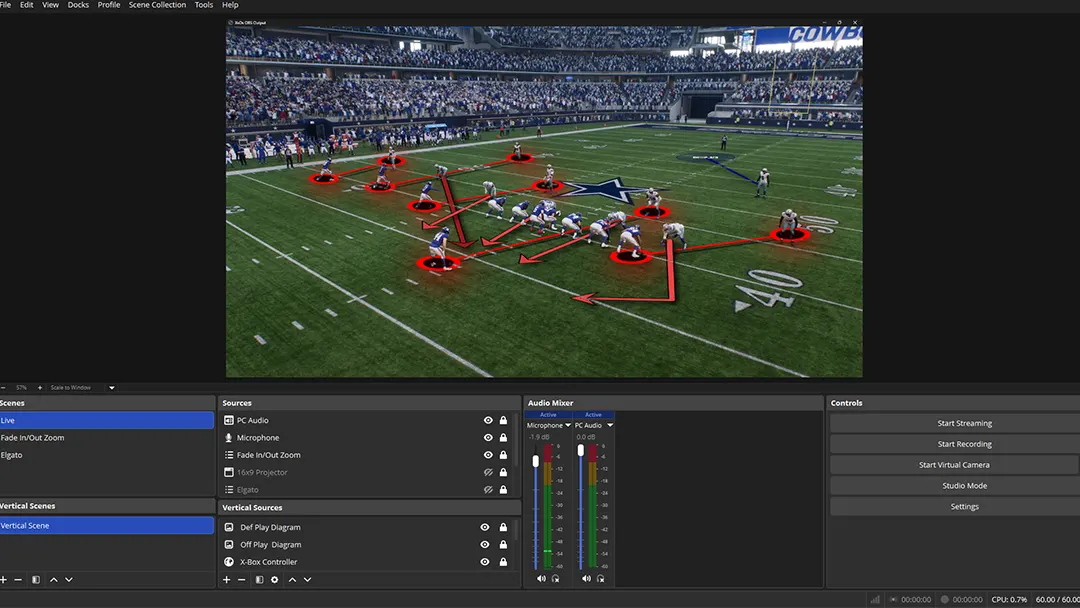
Real Broadcast Workflow
Pro Play Vision output running live inside OBS — one click, no plugin, no setup
The affordable, browser-based alternative to Hudl, KlipDraw, FingerWorks, and Chyron PAINT — broadcast-grade football telestration with no hardware and no five-figure price tag.
Pro Play Vision output running live inside OBS — one click, no plugin, no setup
Your telestration goes live in OBS from a browser tab — no plugin, no download, no hardware. One click opens a clean output window OBS captures — on every plan, from $19.99/month. Competitors ship you a box and an invoice.
Script Mode + Timed Macros let the software draw itself while you talk. No competitor in this price range offers this. It's the difference between manually drawing every route and having a production assistant that never sleeps.
Most competitors here require a download, hardware, or both. ProPlayVision runs entirely in your browser. Open Chrome, log in, start breaking down film. That's it.
FingerWorks and Chyron PAINT are purpose-built for ESPN-level broadcast trucks with dedicated technicians and six-figure budgets. They're extraordinary tools — for a completely different customer. ProPlayVision was built for the individual creator, the high school coach, the streaming studio, and the digital broadcaster who needs broadcast-quality visuals without the broadcast price tag or the production crew.
These tools are the gold standard for major TV networks — and they should be. But they're not built for individual creators, coaches, or streaming studios. Here's an honest look at where they win, where ProPlayVision wins, and who each tool is actually for.
A live-broadcast telestration standard for over 25 years, trusted by major networks. FingerWorks spans hardware-backed broadcast servers with deep NDI/SDI integration and, more recently, an iPad app aimed at coaches and educators. Excellent for live TV — but built around broadcast and coaching workflows, not the content-creator pipeline.
| Feature | FingerWorks | PPV |
|---|---|---|
| Browser-based | ✕ | ✓ |
| Live output to OBS | ✓ | ✓ |
| Script + Macro Automation | ✕ | ✓ |
| Player tracking | ✓ | ✓ |
| Content Creator Workflow | ✕ | ✓ |
| Madden / Gaming Support | ✕ | ✓ |
| Entry Price | Contact sales | $19.99/mo |
| Built-in video editor | ✕ | ✓ |
| Built-in thumbnail creator | ✕ | ✓ |
An all-in-one broadcast production server used globally by top-tier broadcasters. PAINT handles recording, replay, telestration, and live data integration in one unit. Pulls in NFL Next Gen Stats and integrates with professional broadcast trucks. Not a software subscription — it's a full production system.
| Feature | Chyron | PPV |
|---|---|---|
| Browser-based | ✕ | ✓ |
| Live output to OBS | ✓ | ✓ |
| Solo operator friendly | ✕ | ✓ |
| Script + Macro Automation | ✕ | ✓ |
| YouTube / TikTok workflow | ✕ | ✓ |
| Monthly subscription | ✕ | ✓ |
| Entry Price | Contact sales | $19.99/mo |
| Built-in video editor | ✕ | ✓ |
| Built-in thumbnail creator | ✕ | ✓ |
The dominant platform for high school and college football film study. Hudl is excellent for team video management, tagging, and player communication. Their Studio product adds telestration. However, it's priced for institutional budgets, requires team adoption, and isn't built for individual creators or broadcasters.
| Feature | Hudl | PPV |
|---|---|---|
| Individual subscription | ✕ | ✓ |
| Live output to OBS | ✕ | ✓ |
| Script + Macro Automation | ✕ | ✓ |
| Content creator workflow | ✕ | ✓ |
| 9:16 Vertical Mode | ✕ | ✓ |
| Browser-based | Partial | ✓ |
| Entry Price | Contact sales | $19.99/mo |
| Built-in video editor | ✕ | ✓ |
| Built-in thumbnail creator | ✕ | ✓ |
A strong value-focused coaching analysis tool with animated 3D graphics and player tracking. Popular in European football (soccer). Good feature set at a low price. However, it requires a desktop download, has no content creator workflow, no live OBS output, and no Script/Macro automation system.
| Feature | Once Sport | PPV |
|---|---|---|
| Browser-based | ✕ | ✓ |
| Live output to OBS | ✕ | ✓ |
| Script + Macro Automation | ✕ | ✓ |
| American football tools | ✕ | ✓ |
| Content creator workflow | ✕ | ✓ |
| 9:16 Vertical Mode | ✕ | ✓ |
| Entry Price | $17–$88/mo | $19.99/mo |
| Built-in video editor | ✕ | ✓ |
| Built-in thumbnail creator | ✕ | ✓ |
A solid entry-level telestration tool for coaches who want to draw on still frames and animated clips. Three separate versions (Basic, Animate, Motion) that you buy individually. No live video capture, no live OBS output, no browser access, no automation. Works well for basic clip annotation and sharing.
| Feature | KlipDraw | PPV |
|---|---|---|
| Browser-based | ✕ | ✓ |
| Live video capture | ✕ | ✓ |
| Live output to OBS | ✕ | ✓ |
| Script + Macro Automation | ✕ | ✓ |
| 9:16 Vertical Mode | ✕ | ✓ |
| All features in one price | ✕ | ✓ |
| Built-in video editor | ✕ | ✓ |
| Built-in thumbnail creator | ✕ | ✓ |
| Feature | ProPlay Vision |
Finger Works |
Chyron PAINT |
Hudl | Once Sport |
Klip Draw |
|---|---|---|---|---|---|---|
| Access & Platform | ||||||
| Entry Price | $19.99/mo | Contact sales | Contact sales | Contact sales | $17–$88/mo | $89–$395/yr |
| Browser-based (no install) | ✓ | ✕ | ✕ | ~ | ✕ | ✕ |
| Monthly subscription | ✓ | ✕ | ✕ | ✕ | ✓ | ✕ |
| Cancel anytime | ✓ | ✕ | ✕ | ✕ | ✓ | ✕ |
| Individual subscription | ✓ | ✕ | ✕ | ✕ | ✓ | ✓ |
| Core Telestration | ||||||
| Live video capture | ✓ | ✓ | ✓ | ✓ | ✓ | ✕ |
| Animated drawings | ✓ | ✓ | ✓ | ✓ | ✓ | ✓ |
| 3D perspective engine | ✓ | ✓ | ✓ | ~ | ✓ | ✕ |
| 84 American football tools | ✓ | ~ | ~ | ~ | ✕ | ~ |
| Madden / gaming workflow | ✓ | ✕ | ✕ | ✕ | ✕ | ✕ |
| Broadcast & Output | ||||||
| Live output to OBS | ✓ | ✓ | ✓ | ✕ | ✕ | ✕ |
| 9:16 Vertical Mode | ✓ | ✕ | ✕ | ✕ | ✕ | ✕ |
| Screen recording built-in | ✓ | ✓ | ✓ | ~ | ~ | ✕ |
| Automation & AI | ||||||
| Script Mode (Teleprompter) | ✓ | ✕ | ✕ | ✕ | ✕ | ✕ |
| Timed Macro System | ✓ | ✕ | ~ | ✕ | ✕ | ✕ |
| Player tracking | ✓ | ✓ | ✓ | ~ | ✓ | ~ |
| Voice Activation | ✓ | ✕ | ✕ | ✕ | ✕ | ✕ |
| Content Creation | ||||||
| Built-in video editor (trim, transitions, keyframes) | ✓ | ✕ | ✕ | ✕ | ✕ | ✕ |
| Built-in thumbnail creator | ✓ | ✕ | ✕ | ✕ | ✕ | ✕ |
| Built-in play tagging & clip library | ✓ | ✕ | ✕ | ✕ | ✕ | ✕ |
| Voiceover Studio + EQ | ✓ | ✕ | ✕ | ✕ | ✕ | ✕ |
| Storyboard Tool | ✓ | ✕ | ✕ | ✕ | ✕ | ✕ |
| Face Cam + PIP Overlay | ✓ | ✕ | ~ | ✕ | ✕ | ✕ |
| Canvas Masking | ✓ | ✓ | ✓ | ✕ | ~ | ✕ |
✓ = Included · ✕ = Not available · ~ = Partial or limited version. Competitor features based on publicly available information. Pricing varies — visit each competitor's website for current rates.
Script Mode + Timed Macros mean your drawings fire automatically while you talk. Write your script, set your macro timestamps, press play. The software runs the production while you run the analysis. No editor needed. No extra hands needed.
Live output to OBS is something no other tool in this price range offers — a clean capture window on every plan. FingerWorks and Chyron charge thousands for hardware to get your drawings on a stream. ProPlayVision does it from a browser tab, with nothing to install.
No other telestrator is built for Madden and American football content creators. The Madden Camera Preset, Xbox controller overlay, 9:16 vertical mode, and 84 American football specific tools exist because we built this for the community, not the broadcast truck.
Most competitors require a download, hardware, or both. KlipDraw needs three separate purchases. Hudl needs team adoption. FingerWorks broadcast systems need dedicated hardware. ProPlayVision needs a browser. Log in, load your footage, start drawing. That's the entire setup.
$19.99 gets you 84 drawing tools, live video capture, recording, the full 3D perspective and grid engine, voice commands, storyboard, player tracking, projector output and 9:16 vertical. $39.99 adds the film room — script mode, macros, timeline, rosters, canvas masking, color grading and play tagging. $59.99 adds live production — instant replay, on-air graphics, teleprompter and 4-player tracking. Every tier is a complete, usable product — not a stripped-down teaser.
No annual contracts. No hardware investment. No team commitment required. Month-to-month subscriptions mean you're never locked in. Compare that to Hudl's annual team plans or FingerWorks' hardware purchase. Try it, love it, or leave. Simple.
It's a fair question. Here's the honest answer.
ProPlayVision is not trying to replace a broadcast truck. It's built for the creator, coach, and streaming studio who need broadcast-quality visuals without broadcast infrastructure. That's a real category — and nobody else built specifically for it.
Broadcast-quality telestration without the broadcast price tag — built for coaches, analysts, and content creators.